UK:
UK: 
The Salesforce Summer ’26 Release is here, bringing a wide range of updates designed to make Salesforce easier to administer, more secure, and more efficient. From Flow enhancements and security improvements to accessibility features and admin productivity tools, there are plenty of new capabilities that all Salesforce users can benefit from, regardless of the Salesforce products they use.
Alongside these platform-wide enhancements, Salesfore has also introduced a number of new features specifically for Agentforce Nonprofit (AFNP) (formerly Nonprofit Cloud). These include fundraising improvements, new AI-powered agents for nonprofit teams, and updates to Programme, Case and Outcome Management.
If you’re still using Salesforce Nonprofit Success Pack (NPSP), it’s worth noting that while NPSP remains fully supported, Salesforce is no longer adding new functionality to it. The nonprofit-specific features covered in this blog, therefore, apply to AFNP only. However, the General Salesforce Updates featured later in the article are available across all Salesforce environments, including both NPSP and AFNP
So, let’s get into it. First up, Fundraising upgrades within AFNP.
Fundraising
Relaxed Gift Validations
If you are getting ready to migrate your donation data, there’s an important improvement you should be aware of. There is a new option to give you more control over incoming data, so that gift validation rules don’t cause havoc when you’re trying to import data. You can temporarily pause specific validations for the three core gift objects: Gift Commitment, Gift Commitment Schedule, and Gift Transaction.
For the admin, you can control this in Setup under Fundraising Settings. There’s a new Pause Gift Validations section where you can selectively disable validations prior to data import. For developers and consultants, the same control is available directly in the API payload, one per gift object. They default to false, or off, so validations are always on unless explicitly paused.

To remind you to switch the validations back on again, Salesforce will display a banner across the top of the Org universally to indicate that one or more of these validations are temporarily paused. As an admin, this is very helpful because when you’re working on many things at once, it’s easy to forget to switch things back on again. These pauses should not be left on indefinitely; they should only be activated during the data migration.
NextGen Commitment Processing
An issue that many nonprofits face while processing a high volume of recurring gifts every night is that, when the finance team arrives in the morning, those batch processes are often still underway. Knowing this, Salesforce has rolled out a new process called NextGen Commitment Processing, which switches to parallel batch processing. This means it can run multiple batches simultaneously rather than in one long sequential queue. Salesforce is reporting significant improvements in processing times in their own internal testing.
The new engine takes care of lifecycle transitions behind the scenes, automatically closing commitments that have run their course and flagging missed instalments to staff, all without anyone needing to step in manually. Switching it on is easy: just find the toggle in Setup under Fundraising Settings.
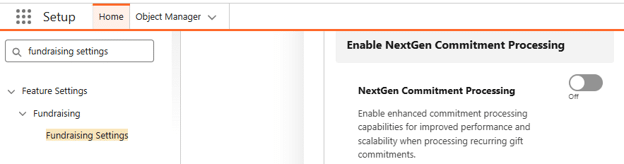
One important note for existing organisations: if you have any scheduled Flows that reference the legacy Gift Commit Processing Flow template, these will need to be disabled, and you’ll need to clone the new template – Coordinate Gift Commitment Processing – in their place. You only have to do this once, but if you don’t, you won’t benefit from these upgraded features.
Troubleshooting Improvement: Last NextGen Commitment Processing Error
Next, there’s a handy new troubleshooting improvement. A new field called Last NextGen Commitment Processing Error appears directly on the Gift Commitment record, so if something goes wrong, you can see exactly what happened without digging through logs. You may need to add it to the page layout yourself.
Get the Self-Service Donor Support Agent
Do you find that a significant portion of your fundraising team’s time is spent communicating with donors who wish to change their regular giving — upgrading, downgrading, changing dates, and so on? If so, the Self-Service Donor Support Agent is really going to help you. If you already use or want to develop your own Experience Cloud portal for your donors, you can now deploy the agent within the site to help donors handle their common requests, such as changing their recurring gift’s amount and frequency. Salesforce says, “Reclaim your staff’s time to focus on building relationships while providing donors with the fast, modern experience they expect”, and while I’m certain that many donors will enjoy the simplicity of engaging with an agent via the portal, others will still want to speak to you directly. The agent offers a choice, and how they communicate changes specifically to you.
Now, let’s move on to Programme, Case and Outcome Management improvements in AFNP.
Programme, Case and Outcome Management
These are all AI (or agentic, to give it the proper name) changes. Don’t stop reading if you don’t have, or currently want, agents in your org. It’s worth finding out what they do because when you are ready to go agentic, you’ll be clearer on what benefits they can offer you.
Welcome to the Upgraded Participant Management Agent
For case managers who spend a significant portion of their time on administrative work related to client meetings, the Participant Management Agent is going to make a real difference.
The agent comes with six subagents, each designed to turbocharge a different part of the Case Management process.

Image credit: https://www.salesforce.com/news/stories/agentforce-nonprofit-announcement/
Participant Summary Subagent
Imagine your case manager has an upcoming meeting with a client. The Participant Summary subagent pulls together a comprehensive but easy-to-digest overview of the client’s programmes, benefit distributions, upcoming goals, tasks, and recent meeting notes, all in seconds. Your case manager can now spend their time understanding the client via the summary, rather than clicking through dozens of related lists.
Participant Notes Subagent
After the meeting, the case manager can insert the raw text notes, or transcription, of the meeting to the Participant Notes subagent. That subagent then polishes and formats them to your organisation’s standards before saving them to the client’s record and automatically extracting any next steps.
Participant Benefit Subagent
At the meeting, it was decided that the client would receive a benefit distribution (e.g. a food parcel). Logging the distribution is simple: the Participant Benefit subagent can create a record from a single sentence, with a confirmation step to make sure the human is always in the loop.
Participant Goal Management Subagent
If you use Goals for your participants, the Participant Goal Management subagent will allow your case managers to check and update a client’s goal statuses without navigating away from the conversation, keeping goals on track with minimal effort.
Participant Referral Management Subagent
If your case manager wants to refer the participant to another programme, they can do it with one sentence, and the Participant Referral Management subagent will create a referral right there from the agent conversation window.
Participant Task Management Subagent
Finally, rather than spend another 20 minutes creating follow-up tasks for themselves or others, the case manager can use the Participant Task Management subagent to handle any follow-up tasks and scheduling, so nothing falls through the cracks.
So, what used to take ages can now be done in minutes. The result is a case manager who feels more confident walking into every client meeting, with the repetitive busy work taken off their plate. That frees them up to support more people, which is what they got into nonprofit work to do in the first place.
Using Outcome Management? Small Update Here
A couple of new fields to add on the page layouts if you need to, and to update your Flows with if applicable:
- ApplicationForm on the existing IndicatorAssignment object (identifies the application form that the indicator assignment measures)
- ApplicationForm on the existing OutcomeActivity object (identifies the application form that relates to the outcome)
And now the exciting part for all Salesforce Admins – let’s jump into General Salesforce Updates (applicable to both NPSP and AFNP).
General Salesforce Updates
Flow
Toast Messages, Finally Native
If you’ve ever built a custom Lightning component just to show a simple “Record saved” message at the end of a Flow, you’ll be pleased to hear those days are over. Flow Builder now includes a native Show Toast Message action, so you can display success, warning, error, and information notifications directly from a Flow. You control the styling, whether the message dismisses itself automatically, and you can even include dynamic record fields or a clickable URL within the message. No custom Lightning Web Component or AppExchange workaround required.

Open a Page
Screen Flows can now redirect users to a newly created record, or to an external URL, as the final step of the Flow. This has long been one of those things admins had to solve with a custom component, so having it built in as a standard action is a welcome time-saver.

New Date Operators for Decisions
Twenty new date operators are now available in Decision elements, including Is Today, Is Tomorrow, Is This Month, and Is Anniversary of Today. These let you build recency and milestone logic, such as renewal reminders, directly into your decision branches without reaching for a formula field workaround. Worth noting, this only applies to Date fields, not DateTime fields.

Batch Size for Scheduled Flows
Scheduled Flows have always processed records in batches of 200. From Summer ’26, you can set your own batch size, anywhere from 1 to 200, directly from the Flow’s start element. If you’ve ever had a scheduled Flow hit limits or errors from processing too many records at once, this gives you a straightforward way to fix it without adding Apex (custom code).

Update Screen Flows with Natural Language Prompts
Using the Agentforce panel inside Flow Builder, you can now describe changes to a Screen Flow in plain language, and have the relevant screen or action elements added, removed, or modified for you. This capability has been pulled back into Beta while Salesforce improves its accuracy, so treat anything it generates as a draft. Review the logic and test the Flow properly before relying on it. (NB this is in Beta)

Image credit: https://help.salesforce.com/s/articleView?id=release-notes.rn_automate_flow_builder_update_screen_flows_with_natural_language_prompts.htm&release=262&type=5
Value Mapping in Transform Elements
If you’re pulling in data from external systems and the incoming values don’t match what’s expected in Salesforce, Value Mapping lets you standardise them once and reuse the mapping across your Flow. Set the rule (“when X comes in, treat it as Y”), and apply it wherever that value appears, rather than solving the same mismatch repeatedly.
Other Flow Updates
A handful of smaller updates round out the Flow improvements this release. Screen Flow components, including buttons, address fields, lookups, email and phone fields, toggles, and URL fields, now support more styling options. Data Tables display readable record names instead of raw Salesforce IDs, with the option to click through to the record. Fault Paths can now be collapsed on the canvas, the same way Decisions and Loops already could, and the Errors and Warnings panel has been tidied into cards to make issues easier to spot while building. Salesforce has also fixed a longstanding issue where Flows referencing an Email Template would break when deployed between environments.
Security and Permissions
Step-Up Authentication for Reports
If Salesforce detects unusual activity around a user viewing or exporting a report, it will now prompt them to re-verify their identity before the report loads. This is aimed squarely at preventing unauthorised data exports, so it’s worth reviewing your report access policies and giving users a heads-up before it catches anyone off guard.
Profile Filtering by Default
Previously, any user could browse the full list of profile names in an org. From Summer ’26, users can only see their own profile name unless they’ve been explicitly granted the View All Profiles permission. If you have delegated admins or power users who rely on seeing other profiles day to day, it’s worth auditing and assigning that permission before enforcement catches them out.
Field Access Summary
Rather than clicking through individual profiles and permission sets one at a time, admins can now go to Object Manager, select a field, and instantly see its full access configuration across every profile, permission set, and permission set group in one place. A genuine time-saver if you’ve ever had to answer “who can edit this field” the hard way.
Permission Dependency Visibility
Changing one permission can trigger knock-on changes to others behind the scenes. Previously, you’d only discover this after the fact by digging through the Setup Audit Trail. Now, the enhanced profile interface surfaces those dependent changes before you hit save, so you know exactly what you’re about to change.
Manage Shared List Views
Letting a user share their personal list view with their team used to mean granting the broad Manage Public List Views permission, which also let them edit or delete every public list view in the org. There’s now a narrower permission, Manage Shared List Views, that allows sharing without the wider access.
Malware Scanning for Files
Malware scanning for Salesforce Files is now generally available. Files uploaded to your org are automatically scanned, and users with the right permissions can be alerted to anything malicious.
Email Domain Verification
If your organisation sends email from Salesforce using your own domain, that domain now needs to be verified through either an active DKIM key or an entry in the Authorised Email Domains list. Emails from unverified domains can fail to send silently, so this is one to check sooner rather than later if you haven’t already.


Other General Updates
Chatter Off by Default for New Orgs
Any new Salesforce org created from Summer ’26 onwards will have Chatter switched off by default. Existing orgs aren’t affected, and you can still turn it back on if you rely on it for Case Feed or Experience Cloud functionality. It’s a clear signal of where Salesforce’s collaboration strategy is heading, with Slack increasingly the default.
Custom Charts on Dashboards
Custom Lightning Web Components can now be added directly to standard dashboards, opening the door to chart types that aren’t available out of the box, such as waterfall charts.
Row-Level Formulas in Reports
Reports can now include up to two row-level formulas, so you can calculate values directly within a report rather than building a new formula field on the object first.
Consistent Report and Dashboard Branding
You can now set a brand colour palette once in theme settings and apply it automatically across report and dashboard charts, instead of formatting each one individually.

More Time Zones and Languages
Twenty-seven additional time zones have been added, along with clearer naming (Nuuk instead of the outdated Godthab, for example). Catalan and Basque have also been added as Beta user interface languages.
Larger File Uploads on Experience Cloud
Sites built on Experience Cloud can now accept file uploads of up to 10 GB, a significant jump from the previous 2 GB limit.
Accessibility
Page Headers & Modal Windows
Before, zooming in over 200% caused headers to block the scrollable sections of a page, and pushed buttons beyond the screen. The update ensures that headers scroll correctly with the page, and buttons remain visible. Update needs to be enabled in Setup. Setup > Release Updates > Follow testing and activation steps.
Dark Mode
If you have users with visual impairments or prone to migraines, this update could be a game-changer. In fact, it could benefit all users to reduce eye strain in low light, and it looks cool. (Please note, it is currently in Beta, but should be available to your org to try it out and activate if it’s useful).

To access it, go to Themes and Branding and find the Theme with SLDS2.

Scroll down to find the checkbox to allow Dark Mode for your users. This Help article will tell you more about it, along with any potential issues and their resolutions. It’s currently only available via the Salesforce Cosmos Theme, but from Winter ’27, it will be available for custom themes too.

Activate the theme to enable SLDS2 (remember this will overwrite your current org theme). The user can then opt to use Light or Dark Mode via their profile icon, as shown below:

Restore Deleted Records
Hierarchical Relationships
If you accidentally delete a parent record along with its related child records, you can recover them all together in one go, rather than piecing them back together manually. The system identifies which records were connected before deletion and shows you an interactive tree view, so you can see exactly what was linked and choose what to restore. Because the relationships between parent and child records are preserved, everything comes back the way it was, saving you time and reducing the risk of data ending up out of sync.
Files & Attachments
In addition, you can now choose to restore files and attachments that have been cascade-deleted as part of the restoration process.
Restore Retry
If the bulk restore fails partway through, rather than having to start start over (and risk record duplication from records that had already successfully restored), you can now just click “Retry” to continue the process at the point it failed, ensuring no duplications are added by the process and reducing the amount of time you have to spend on restoring deleted records.
Resources
There are, of course, many other Salesforce Summer ’26 Release updates, so it’s important to highlight some helpful Salesforce resources.
- If you want to dive deeper into any of the highlights above, the Summer ’26 Release Readiness is now live on Salesforce+. It includes a series of episodes that cover top features – including an episode for Nonprofit.
- If you are migrating from NPSP to AFNP, the following Salesforce Guides will be very useful in supporting in-house admins with the migration.
There are three .pdfs you can download:
- Nonprofit Cloud Migration Guide
- Nonprofit Cloud Implementation Guide
- Fundraising Implementation Guide
They’re well worth a read through (pro tip: throw them into Claude or ChatGPT if you want a quickly digestible summary of the key points) and will set you up for success if you are taking the plunge and moving over to the Agent Side.
As you can see, there was not a big leap forward for us in the nonprofit world this summer. However, given the other changes around anti-phishing MFA requirements that’s not such a bad thing. Please note: if you haven’t reviewed your MFA requirements, see our MFA blog post here, as it is already being enforced in Production environments and is important for admin and privileged user logins.
We hope the highlights above were useful, and we’re happy to discuss them with you if you have any questions.
Come back in the autumn for our Winter Release blog – we already know there’s going to be some exciting agent updates, and true to Salesforce fashion, there will likely be some big updates too.